
Filing Rules
Every document you add to Papermerge needs a home — a folder to live in. Choosing that folder by hand gets tedious fast: the more documents you have and the deeper your folder tree grows, the harder it is to remember where each kind of document belongs.
A filing rule lets you decide once, per category. After that, whenever you give a document that category, Papermerge moves it to the right folder for you — and can rename it too.
Why filing rules help
Section titled “Why filing rules help”Say you receive an invoice from a supplier, Acme GmbH, and open Papermerge to file it. Where does it go?
/Suppliers/2024/acme-gmbh/invoice-2024-01.pdf?/Invoices/2024/Suppliers/acme-gmbh-2024-01.pdf?/Accounting/Invoices/?
Without an agreed rule you either stop and think every time, or file things inconsistently and lose track of them later. A filing rule settles the question once.
How a filing rule works
Section titled “How a filing rule works”You attach a filing rule to a category. The rule describes where documents of that category belong. From then on, every time a document is given that category, Papermerge evaluates the rule and moves the document there.
A filing rule has two parts:
| Part | Field in the category dialog | Purpose |
|---|---|---|
| Target folder | Target Folder | The folder the document is moved into. Required. |
| Rename | Rename Document (optional) | A new title for the document. Leave it empty to keep the current title. |
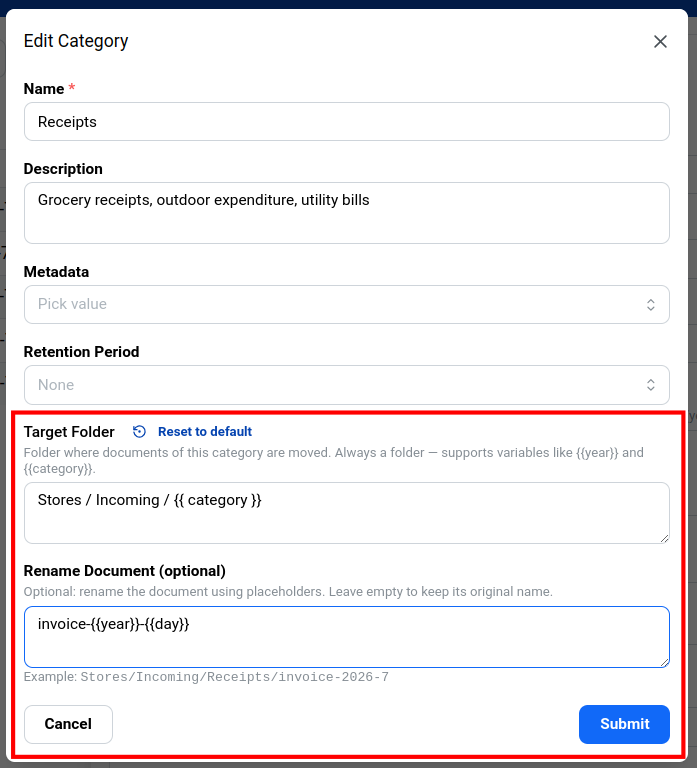
Example
Section titled “Example”For the Incoming Invoices category, set Target Folder to /Store/Invoices
and leave Rename Document empty. Now, whenever you assign Incoming Invoices
to a document, Papermerge moves it into /Store/Invoices and keeps its title
unchanged. Any folders in the path that don’t exist yet are created
automatically.
Writing the path
Section titled “Writing the path”Leading and trailing slashes are optional, and spaces around a slash are ignored. These paths are all equivalent:
/Store/Invoices/Store/Invoices/Store / InvoicesStore / Invoices
The Rename Document field names a file, not a path, so it must not contain a slash — Papermerge rejects the rule if it does.
Root folder
Section titled “Root folder”By default, a rule’s path starts at the user’s own home folder, so
/Suppliers/AcmeGmbH/ lands in that user’s Suppliers/AcmeGmbH/.
In a team account you can change the starting point with the category’s Root Folder field and point it at a cabinet or a shared folder instead. When the root is a cabinet, documents filed by the rule also move into that cabinet’s ownership.
Dynamic paths with placeholders
Section titled “Dynamic paths with placeholders”A fixed path is enough for simple cases, but often the folder — or the new title — should depend on the document itself: its category, or the date it was added. Placeholders cover this.
A placeholder is a name wrapped in double curly braces, like {{year}}. Spaces
inside the braces don’t matter — {{year}} and {{ year }} behave the same.
Each time the rule runs, Papermerge replaces every placeholder with the
document’s actual value.
| Placeholder | Replaced with |
|---|---|
{{id}} | The document’s unique ID. Always available, so it’s a safe way to guarantee a unique path. |
{{title}} | The document’s title. |
{{file_name}} | The document’s original file name. |
{{category}} | The document’s category name. |
{{year}} | The year the document was added, e.g. 2026. |
{{month}} | The month it was added, as a plain number: 3, 10 (not 03). |
{{day}} | The day of the month, as a plain number: 6, 27. |
If you mistype a placeholder, Papermerge rejects the rule when you save it — so you find out immediately instead of after documents have been misfiled.
You can use placeholders in both fields. For example, for a Grocery Invoice category:
- Target Folder:
/Invoices/{{category}}/{{year}} - Rename Document:
invoice-{{year}}-{{month}}-{{day}}
Assigning Grocery Invoice to a document added on 7 September 2026 moves it to
/Invoices/Grocery Invoice/2026/ and renames it to invoice-2026-9-7.
When the rule runs
Section titled “When the rule runs”A filing rule takes effect when a category is assigned to a document. If you add or change a rule on a category that already contains documents, Papermerge re-files all of them to match the new rule.